FREE SHIPPING FOR ORDERS OVER $100

AI Glasses Mastery: Setup, Lens Installation, Camera, Bluetooth & Audio Guide
AI Translation Setup – Real-Time Language on Your Glasses
Activate real-time AI translation on your AI glasses in minutes. Charge the glasses, install the companion app, and pair via Bluetooth. Navigate to the “Translate” section, select your source and target languages, and ensure a stable internet connection—translation relies on cloud processing. Speak clearly for accurate voice capture, and adjust text size in the app for optimal readability. With hands-free translation, you are ready for cross-language conversations anywhere .
Prescription Lens Installation – Step-by-Step Guide
Installing prescription lenses into your smart glasses is simple. Place the glasses upside down on a soft cloth and loosen the small screws on the inner frame rim. Gently push out the old lenses. Align your new lenses with the frame grooves—match any orientation marks. Insert the top edge first, press the bottom into place, and tighten the screws firmly. Wipe clean with a microfiber cloth and check that the display remains unobstructed . Your all-day wearable is now vision-ready.
Video Recording – Full Camera Operation Guide
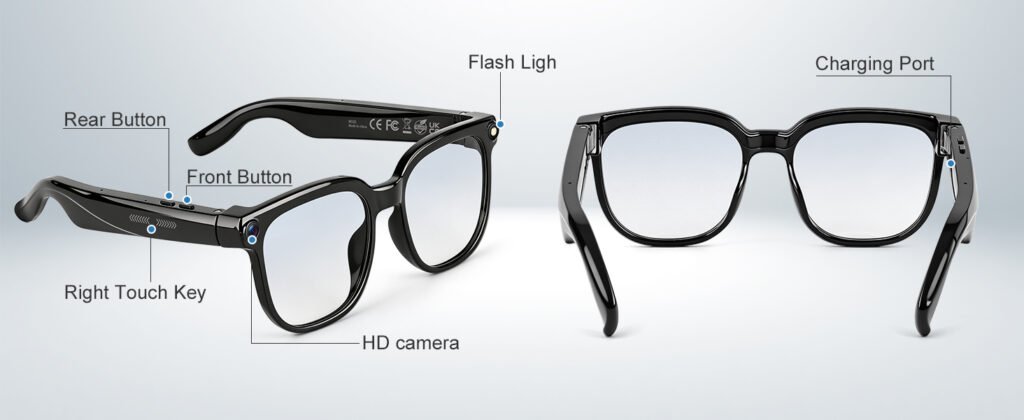
Recording video hands-free is straightforward. Locate the capture button or use the touch gesture. A short press starts recording—a red indicator light confirms you are live. Set your preferred resolution (1080p/30fps for daily use) in the app before filming. Keep the glasses at eye level to match your natural field of view. Use loop recording for extended sessions. Transfer files via the app or USB-C. Always wipe the camera lens before shooting for crisp footage .
Bluetooth Pairing & Disconnection Troubleshooting
Bluetooth pairing is essential for smart glasses functionality. Power on the glasses, open your phone’s Bluetooth settings, and select the device name. Confirm the PIN if prompted. If disconnections occur, stay within 30 feet and toggle Bluetooth off and on. Use the app to “Forget Device” and re-pair. Disable battery optimization for the companion app on Android. Update firmware regularly and factory reset as a last resort (hold power for 10 seconds until LED flashes red) .
Open-Ear Audio – Volume & Noise Control Tips
Open-ear audio keeps you aware of your surroundings. Use the app’s EQ presets—choose “Outdoor Mode” for noisy streets or “Vocal Clarity” for podcasts. Keep volume at 60–70% for balanced audibility. For calls, enable active noise cancellation (ANC) to reduce background noise. Ensure the temple arms fit snugly to prevent sound leakage. Clean the speaker grilles weekly with a dry brush. Enable “adaptive volume” if available for automatic adjustments based on ambient noise levels.